Struct Tween
pub struct Tween { /* private fields */ }Expand description
Godot class Tween.
Inherits RefCounted.
Related symbols:
tween: sidecar module with related enum/flag typesITween: virtual methodsSignalsOfTween: signal collection
See also Godot docs for Tween.
§Not instantiable
This class cannot be constructed. Obtain Gd<Tween> instances via Godot APIs.
§Godot docs
Tweens are mostly useful for animations requiring a numerical property to be interpolated over a range of values. The name tween comes from in-betweening, an animation technique where you specify keyframes and the computer interpolates the frames that appear between them. Animating something with a Tween is called tweening.
Tween is more suited than AnimationPlayer for animations where you don’t know the final values in advance. For example, interpolating a dynamically-chosen camera zoom value is best done with a Tween; it would be difficult to do the same thing with an AnimationPlayer node. Tweens are also more light-weight than AnimationPlayer, so they are very much suited for simple animations or general tasks that don’t require visual tweaking provided by the editor. They can be used in a “fire-and-forget” manner for some logic that normally would be done by code. You can e.g. make something shoot periodically by using a looped CallbackTweener with a delay.
A Tween can be created by using either create_tween or create_tween. Tweens created manually (i.e. by using Tween.new()) are invalid and can’t be used for tweening values.
A tween animation is created by adding Tweeners to the Tween object, using tween_property, tween_interval, tween_callback or tween_method:
var tween = get_tree().create_tween()
tween.tween_property($Sprite, "modulate", Color.RED, 1.0)
tween.tween_property($Sprite, "scale", Vector2(), 1.0)
tween.tween_callback($Sprite.queue_free)
This sequence will make the $Sprite node turn red, then shrink, before finally calling queue_free to free the sprite. Tweeners are executed one after another by default. This behavior can be changed using parallel and set_parallel.
When a Tweener is created with one of the tween_* methods, a chained method call can be used to tweak the properties of this Tweener. For example, if you want to set a different transition type in the above example, you can use set_trans:
var tween = get_tree().create_tween()
tween.tween_property($Sprite, "modulate", Color.RED, 1.0).set_trans(Tween.TRANS_SINE)
tween.tween_property($Sprite, "scale", Vector2(), 1.0).set_trans(Tween.TRANS_BOUNCE)
tween.tween_callback($Sprite.queue_free)
Most of the Tween methods can be chained this way too. In the following example the Tween is bound to the running script’s node and a default transition is set for its Tweeners:
var tween = get_tree().create_tween().bind_node(self).set_trans(Tween.TRANS_ELASTIC)
tween.tween_property($Sprite, "modulate", Color.RED, 1.0)
tween.tween_property($Sprite, "scale", Vector2(), 1.0)
tween.tween_callback($Sprite.queue_free)
Another interesting use for Tweens is animating arbitrary sets of objects:
var tween = create_tween()
for sprite in get_children():
	tween.tween_property(sprite, "position", Vector2(0, 0), 1.0)
In the example above, all children of a node are moved one after another to position (0, 0).
You should avoid using more than one Tween per object’s property. If two or more tweens animate one property at the same time, the last one created will take priority and assign the final value. If you want to interrupt and restart an animation, consider assigning the Tween to a variable:
var tween
func animate():
	if tween:
		tween.kill() # Abort the previous animation.
	tween = create_tween()
Some Tweeners use transitions and eases. The first accepts a [enum TransitionType] constant, and refers to the way the timing of the animation is handled (see easings.net for some examples). The second accepts an [enum EaseType] constant, and controls where the trans_type is applied to the interpolation (in the beginning, the end, or both). If you don’t know which transition and easing to pick, you can try different [enum TransitionType] constants with EaseType::IN_OUT, and use the one that looks best.
Tween easing and transition types cheatsheet
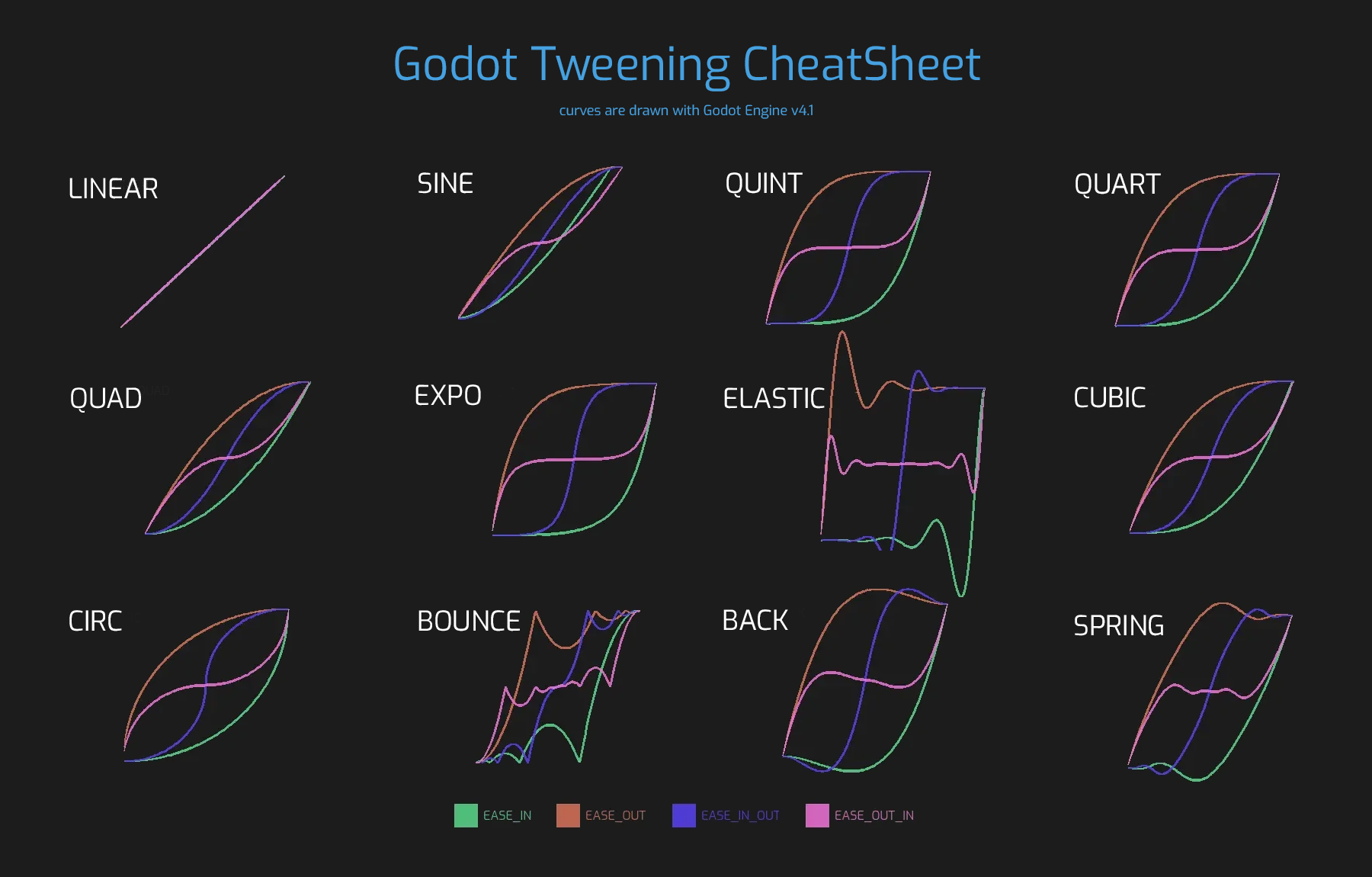
Note: Tweens are not designed to be reused and trying to do so results in an undefined behavior. Create a new Tween for each animation and every time you replay an animation from start. Keep in mind that Tweens start immediately, so only create a Tween when you want to start animating.
Note: The tween is processed after all of the nodes in the current frame, i.e. node’s process method would be called before the tween (or physics_process depending on the value passed to set_process_mode).
Implementations§
§impl Tween
impl Tween
pub fn tween_property(
&mut self,
object: impl AsArg<Gd<Object>>,
property: impl AsArg<NodePath>,
final_val: &Variant,
duration: f64,
) -> Gd<PropertyTweener>
pub fn tween_property( &mut self, object: impl AsArg<Gd<Object>>, property: impl AsArg<NodePath>, final_val: &Variant, duration: f64, ) -> Gd<PropertyTweener>
Creates and appends a PropertyTweener. This method tweens a property of an object between an initial value and final_val in a span of time equal to duration, in seconds. The initial value by default is the property’s value at the time the tweening of the PropertyTweener starts.
var tween = create_tween()
tween.tween_property($Sprite, "position", Vector2(100, 200), 1.0)
tween.tween_property($Sprite, "position", Vector2(200, 300), 1.0)
will move the sprite to position (100, 200) and then to (200, 300). If you use from or from_current, the starting position will be overwritten by the given value instead. See other methods in PropertyTweener to see how the tweening can be tweaked further.
Note: You can find the correct property name by hovering over the property in the Inspector. You can also provide the components of a property directly by using "property:component" (eg. position:x), where it would only apply to that particular component.
Example: Moving an object twice from the same position, with different transition types:
var tween = create_tween()
tween.tween_property($Sprite, "position", Vector2.RIGHT * 300, 1.0).as_relative().set_trans(Tween.TRANS_SINE)
tween.tween_property($Sprite, "position", Vector2.RIGHT * 300, 1.0).as_relative().from_current().set_trans(Tween.TRANS_EXPO)
pub fn tween_interval(&mut self, time: f64) -> Gd<IntervalTweener>
pub fn tween_interval(&mut self, time: f64) -> Gd<IntervalTweener>
Creates and appends an IntervalTweener. This method can be used to create delays in the tween animation, as an alternative to using the delay in other Tweeners, or when there’s no animation (in which case the Tween acts as a timer). time is the length of the interval, in seconds.
Example: Creating an interval in code execution:
# ... some code
await create_tween().tween_interval(2).finished
# ... more code
Example: Creating an object that moves back and forth and jumps every few seconds:
var tween = create_tween().set_loops()
tween.tween_property($Sprite, "position:x", 200.0, 1.0).as_relative()
tween.tween_callback(jump)
tween.tween_interval(2)
tween.tween_property($Sprite, "position:x", -200.0, 1.0).as_relative()
tween.tween_callback(jump)
tween.tween_interval(2)
pub fn tween_callback(&mut self, callback: &Callable) -> Gd<CallbackTweener>
pub fn tween_callback(&mut self, callback: &Callable) -> Gd<CallbackTweener>
Creates and appends a CallbackTweener. This method can be used to call an arbitrary method in any object. Use bind to bind additional arguments for the call.
Example: Object that keeps shooting every 1 second:
var tween = get_tree().create_tween().set_loops()
tween.tween_callback(shoot).set_delay(1.0)
Example: Turning a sprite red and then blue, with 2 second delay:
var tween = get_tree().create_tween()
tween.tween_callback($Sprite.set_modulate.bind(Color.RED)).set_delay(2)
tween.tween_callback($Sprite.set_modulate.bind(Color.BLUE)).set_delay(2)
pub fn tween_method(
&mut self,
method: &Callable,
from: &Variant,
to: &Variant,
duration: f64,
) -> Gd<MethodTweener>
pub fn tween_method( &mut self, method: &Callable, from: &Variant, to: &Variant, duration: f64, ) -> Gd<MethodTweener>
Creates and appends a MethodTweener. This method is similar to a combination of tween_callback and tween_property. It calls a method over time with a tweened value provided as an argument. The value is tweened between from and to over the time specified by duration, in seconds. Use bind to bind additional arguments for the call. You can use set_ease and set_trans to tweak the easing and transition of the value or set_delay to delay the tweening.
Example: Making a 3D object look from one point to another point:
var tween = create_tween()
tween.tween_method(look_at.bind(Vector3.UP), Vector3(-1, 0, -1), Vector3(1, 0, -1), 1.0) # The look_at() method takes up vector as second argument.
Example: Setting the text of a Label, using an intermediate method and after a delay:
func _ready():
	var tween = create_tween()
	tween.tween_method(set_label_text, 0, 10, 1.0).set_delay(1.0)

func set_label_text(value: int):
	$Label.text = "Counting " + str(value)
pub fn tween_subtween(
&mut self,
subtween: impl AsArg<Gd<Tween>>,
) -> Gd<SubtweenTweener>
pub fn tween_subtween( &mut self, subtween: impl AsArg<Gd<Tween>>, ) -> Gd<SubtweenTweener>
Creates and appends a SubtweenTweener. This method can be used to nest subtween within this Tween, allowing for the creation of more complex and composable sequences.
# Subtween will rotate the object.
var subtween = create_tween()
subtween.tween_property(self, "rotation_degrees", 45.0, 1.0)
subtween.tween_property(self, "rotation_degrees", 0.0, 1.0)

# Parent tween will execute the subtween as one of its steps.
var tween = create_tween()
tween.tween_property(self, "position:x", 500, 3.0)
tween.tween_subtween(subtween)
tween.tween_property(self, "position:x", 300, 2.0)
Note: The methods pause, stop, and set_loops can cause the parent Tween to get stuck on the subtween step; see the documentation for those methods for more information.
Note: The pause and process modes set by set_pause_mode and set_process_mode on subtween will be overridden by the parent Tween’s settings.
pub fn custom_step(&mut self, delta: f64) -> bool
pub fn custom_step(&mut self, delta: f64) -> bool
Processes the Tween by the given delta value, in seconds. This is mostly useful for manual control when the Tween is paused. It can also be used to end the Tween animation immediately, by setting delta longer than the whole duration of the Tween animation.
Returns true if the Tween still has Tweeners that haven’t finished.
pub fn stop(&mut self)
pub fn stop(&mut self)
Stops the tweening and resets the Tween to its initial state. This will not remove any appended Tweeners.
Note: This does not reset targets of PropertyTweeners to their values when the Tween first started.
var tween = create_tween()

# Will move from 0 to 500 over 1 second.
position.x = 0.0
tween.tween_property(self, "position:x", 500, 1.0)

# Will be at (about) 250 when the timer finishes.
await get_tree().create_timer(0.5).timeout

# Will now move from (about) 250 to 500 over 1 second,
# thus at half the speed as before.
tween.stop()
tween.play()
Note: If a Tween is stopped and not bound to any node, it will exist indefinitely until manually started or invalidated. If you lose a reference to such Tween, you can retrieve it using get_processed_tweens.
pub fn pause(&mut self)
pub fn pause(&mut self)
Pauses the tweening. The animation can be resumed by using play.
Note: If a Tween is paused and not bound to any node, it will exist indefinitely until manually started or invalidated. If you lose a reference to such Tween, you can retrieve it using get_processed_tweens.
pub fn play(&mut self)
pub fn play(&mut self)
Resumes a paused or stopped Tween.
pub fn kill(&mut self)
pub fn kill(&mut self)
Aborts all tweening operations and invalidates the Tween.
pub fn get_total_elapsed_time(&self) -> f64
pub fn get_total_elapsed_time(&self) -> f64
Returns the total time in seconds the Tween has been animating (i.e. the time since it started, not counting pauses etc.). The time is affected by set_speed_scale, and stop will reset it to 0.
Note: As it results from accumulating frame deltas, the time returned after the Tween has finished animating will be slightly greater than the actual Tween duration.
pub fn is_running(&self) -> bool
pub fn is_running(&self) -> bool
Returns whether the Tween is currently running, i.e. it wasn’t paused and it’s not finished.
pub fn is_valid(&self) -> bool
pub fn is_valid(&self) -> bool
Returns whether the Tween is valid. A valid Tween is a Tween contained by the scene tree (i.e. the array from get_processed_tweens will contain this Tween). A Tween might become invalid when it has finished tweening, is killed, or when created with Tween.new(). Invalid Tweens can’t have Tweeners appended.
pub fn bind_node(&mut self, node: impl AsArg<Gd<Node>>) -> Gd<Tween>
pub fn bind_node(&mut self, node: impl AsArg<Gd<Node>>) -> Gd<Tween>
Binds this Tween with the given node. Tweens are processed directly by the SceneTree, so they run independently of the animated nodes. When you bind a Node with the Tween, the Tween will halt the animation when the object is not inside tree and the Tween will be automatically killed when the bound object is freed. Also TweenPauseMode::BOUND will make the pausing behavior dependent on the bound node.
For a shorter way to create and bind a Tween, you can use create_tween.
pub fn set_process_mode(&mut self, mode: TweenProcessMode) -> Gd<Tween>
pub fn set_process_mode(&mut self, mode: TweenProcessMode) -> Gd<Tween>
Determines whether the Tween should run after process frames (see process) or physics frames (see physics_process).
Default value is TweenProcessMode::IDLE.
pub fn set_pause_mode(&mut self, mode: TweenPauseMode) -> Gd<Tween>
pub fn set_pause_mode(&mut self, mode: TweenPauseMode) -> Gd<Tween>
Determines the behavior of the Tween when the SceneTree is paused.
Default value is TweenPauseMode::BOUND.
pub fn set_ignore_time_scale(&mut self) -> Gd<Tween>
pub fn set_ignore_time_scale(&mut self) -> Gd<Tween>
To set the default parameters, use set_ignore_time_scale_ex and its builder methods. See the book for detailed usage instructions.
If ignore is true, the tween will ignore [member Engine.time_scale] and update with the real, elapsed time. This affects all Tweeners and their delays. Default value is false.
pub fn set_ignore_time_scale_ex<'ex>(&'ex mut self) -> ExSetIgnoreTimeScale<'ex>
pub fn set_ignore_time_scale_ex<'ex>(&'ex mut self) -> ExSetIgnoreTimeScale<'ex>
If ignore is true, the tween will ignore [member Engine.time_scale] and update with the real, elapsed time. This affects all Tweeners and their delays. Default value is false.
pub fn set_parallel(&mut self) -> Gd<Tween>
pub fn set_parallel(&mut self) -> Gd<Tween>
To set the default parameters, use set_parallel_ex and its builder methods. See the book for detailed usage instructions.
If parallel is true, the Tweeners appended after this method will by default run simultaneously, as opposed to sequentially.
Note: Just like with parallel, the tweener added right before this method will also be part of the parallel step.
tween.tween_property(self, "position", Vector2(300, 0), 0.5)
tween.set_parallel()
tween.tween_property(self, "modulate", Color.GREEN, 0.5) # Runs together with the position tweener.
pub fn set_parallel_ex<'ex>(&'ex mut self) -> ExSetParallel<'ex>
pub fn set_parallel_ex<'ex>(&'ex mut self) -> ExSetParallel<'ex>
If parallel is true, the Tweeners appended after this method will by default run simultaneously, as opposed to sequentially.
Note: Just like with parallel, the tweener added right before this method will also be part of the parallel step.
tween.tween_property(self, "position", Vector2(300, 0), 0.5)
tween.set_parallel()
tween.tween_property(self, "modulate", Color.GREEN, 0.5) # Runs together with the position tweener.
pub fn set_loops(&mut self) -> Gd<Tween>
pub fn set_loops(&mut self) -> Gd<Tween>
To set the default parameters, use set_loops_ex and its builder methods. See the book for detailed usage instructions.
Sets the number of times the tweening sequence will be repeated, i.e. set_loops(2) will run the animation twice.
Calling this method without arguments will make the Tween run infinitely, until either it is killed with kill, the Tween’s bound node is freed, or all the animated objects have been freed (which makes further animation impossible).
Warning: Make sure to always add some duration/delay when using infinite loops. To prevent the game freezing, 0-duration looped animations (e.g. a single CallbackTweener with no delay) are stopped after a small number of loops, which may produce unexpected results. If a Tween’s lifetime depends on some node, always use bind_node.
pub fn set_loops_ex<'ex>(&'ex mut self) -> ExSetLoops<'ex>
pub fn set_loops_ex<'ex>(&'ex mut self) -> ExSetLoops<'ex>
Sets the number of times the tweening sequence will be repeated, i.e. set_loops(2) will run the animation twice.
Calling this method without arguments will make the Tween run infinitely, until either it is killed with kill, the Tween’s bound node is freed, or all the animated objects have been freed (which makes further animation impossible).
Warning: Make sure to always add some duration/delay when using infinite loops. To prevent the game freezing, 0-duration looped animations (e.g. a single CallbackTweener with no delay) are stopped after a small number of loops, which may produce unexpected results. If a Tween’s lifetime depends on some node, always use bind_node.
pub fn get_loops_left(&self) -> i32
pub fn get_loops_left(&self) -> i32
Returns the number of remaining loops for this Tween (see set_loops). A return value of -1 indicates an infinitely looping Tween, and a return value of 0 indicates that the Tween has already finished.
pub fn set_speed_scale(&mut self, speed: f32) -> Gd<Tween>
pub fn set_speed_scale(&mut self, speed: f32) -> Gd<Tween>
Scales the speed of tweening. This affects all Tweeners and their delays.
pub fn set_trans(&mut self, trans: TransitionType) -> Gd<Tween>
pub fn set_trans(&mut self, trans: TransitionType) -> Gd<Tween>
Sets the default transition type for PropertyTweeners and MethodTweeners appended after this method.
Before this method is called, the default transition type is TransitionType::LINEAR.
var tween = create_tween()
tween.tween_property(self, "position", Vector2(300, 0), 0.5) # Uses TRANS_LINEAR.
tween.set_trans(Tween.TRANS_SINE)
tween.tween_property(self, "rotation_degrees", 45.0, 0.5) # Uses TRANS_SINE.
pub fn set_ease(&mut self, ease: EaseType) -> Gd<Tween>
pub fn set_ease(&mut self, ease: EaseType) -> Gd<Tween>
Sets the default ease type for PropertyTweeners and MethodTweeners appended after this method.
Before this method is called, the default ease type is EaseType::IN_OUT.
var tween = create_tween()
tween.tween_property(self, "position", Vector2(300, 0), 0.5) # Uses EASE_IN_OUT.
tween.set_ease(Tween.EASE_IN)
tween.tween_property(self, "rotation_degrees", 45.0, 0.5) # Uses EASE_IN.
pub fn parallel(&mut self) -> Gd<Tween>
pub fn parallel(&mut self) -> Gd<Tween>
Makes the next Tweener run parallelly to the previous one.
var tween = create_tween()
tween.tween_property(...)
tween.parallel().tween_property(...)
tween.parallel().tween_property(...)
All Tweeners in the example will run at the same time.
You can make the Tween parallel by default by using set_parallel.
pub fn chain(&mut self) -> Gd<Tween>
pub fn chain(&mut self) -> Gd<Tween>
Used to chain two Tweeners after set_parallel is called with true.
var tween = create_tween().set_parallel(true)
tween.tween_property(...)
tween.tween_property(...) # Will run parallelly with above.
tween.chain().tween_property(...) # Will run after two above are finished.
pub fn interpolate_value(
initial_value: &Variant,
delta_value: &Variant,
elapsed_time: f64,
duration: f64,
trans_type: TransitionType,
ease_type: EaseType,
) -> Variant
pub fn interpolate_value( initial_value: &Variant, delta_value: &Variant, elapsed_time: f64, duration: f64, trans_type: TransitionType, ease_type: EaseType, ) -> Variant
This method can be used for manual interpolation of a value, when you don’t want Tween to do animating for you. It’s similar to lerp, but with support for custom transition and easing.
initial_value is the starting value of the interpolation.
delta_value is the change of the value in the interpolation, i.e. it’s equal to final_value - initial_value.
elapsed_time is the time in seconds that passed after the interpolation started and it’s used to control the position of the interpolation. E.g. when it’s equal to half of the duration, the interpolated value will be halfway between initial and final values. This value can also be greater than duration or lower than 0, which will extrapolate the value.
duration is the total time of the interpolation.
Note: If duration is equal to 0, the method will always return the final value, regardless of elapsed_time provided.
Methods from Deref<Target = RefCounted>§
pub fn get_reference_count(&self) -> i32
pub fn get_reference_count(&self) -> i32
Returns the current reference count.
Methods from Deref<Target = Object>§
pub fn get_script(&self) -> Option<Gd<Script>>
pub fn set_script(&mut self, script: impl AsArg<Option<Gd<Script>>>)
pub fn connect( &mut self, signal: impl AsArg<StringName>, callable: &Callable, ) -> Error
pub fn connect_flags( &mut self, signal: impl AsArg<StringName>, callable: &Callable, flags: ConnectFlags, ) -> Error
pub fn is_class(&self, class: impl AsArg<GString>) -> bool
pub fn is_class(&self, class: impl AsArg<GString>) -> bool
Returns true if the object inherits from the given class. See also get_class.
var sprite2d = Sprite2D.new()
sprite2d.is_class("Sprite2D") # Returns true
sprite2d.is_class("Node")     # Returns true
sprite2d.is_class("Node3D")   # Returns false
Note: This method ignores class_name declarations in the object’s script.
pub fn set(&mut self, property: impl AsArg<StringName>, value: &Variant)
pub fn set(&mut self, property: impl AsArg<StringName>, value: &Variant)
Assigns value to the given property. If the property does not exist or the given value’s type doesn’t match, nothing happens.
var node = Node2D.new()
node.set("global_scale", Vector2(8, 2.5))
print(node.global_scale) # Prints (8.0, 2.5)
Note: In C#, property must be in snake_case when referring to built-in Godot properties. Prefer using the names exposed in the PropertyName class to avoid allocating a new StringName on each call.
pub fn get(&self, property: impl AsArg<StringName>) -> Variant
pub fn get(&self, property: impl AsArg<StringName>) -> Variant
Returns the Variant value of the given property. If the property does not exist, this method returns null.
var node = Node2D.new()
node.rotation = 1.5
var a = node.get("rotation") # a is 1.5
Note: In C#, property must be in snake_case when referring to built-in Godot properties. Prefer using the names exposed in the PropertyName class to avoid allocating a new StringName on each call.
pub fn set_indexed(
&mut self,
property_path: impl AsArg<NodePath>,
value: &Variant,
)
pub fn set_indexed( &mut self, property_path: impl AsArg<NodePath>, value: &Variant, )
Assigns a new value to the property identified by the property_path. The path should be a NodePath relative to this object, and can use the colon character (:) to access nested properties.
var node = Node2D.new()
node.set_indexed("position", Vector2(42, 0))
node.set_indexed("position:y", -10)
print(node.position) # Prints (42.0, -10.0)
Note: In C#, property_path must be in snake_case when referring to built-in Godot properties. Prefer using the names exposed in the PropertyName class to avoid allocating a new StringName on each call.
pub fn get_indexed(&self, property_path: impl AsArg<NodePath>) -> Variant
pub fn get_indexed(&self, property_path: impl AsArg<NodePath>) -> Variant
Gets the object’s property indexed by the given property_path. The path should be a NodePath relative to the current object and can use the colon character (:) to access nested properties.
Examples: "position:x" or "material:next_pass:blend_mode".
var node = Node2D.new()
node.position = Vector2(5, -10)
var a = node.get_indexed("position")   # a is Vector2(5, -10)
var b = node.get_indexed("position:y") # b is -10
Note: In C#, property_path must be in snake_case when referring to built-in Godot properties. Prefer using the names exposed in the PropertyName class to avoid allocating a new StringName on each call.
Note: This method does not support actual paths to nodes in the SceneTree, only sub-property paths. In the context of nodes, use get_node_and_resource instead.
pub fn get_property_list(&self) -> Array<Dictionary<Variant, Variant>>
pub fn get_property_list(&self) -> Array<Dictionary<Variant, Variant>>
Returns the object’s property list as an Array of dictionaries. Each Dictionary contains the following entries:
-
nameis the property’s name, as aString; -
class_nameis an emptyStringName, unless the property isVariantType::OBJECTand it inherits from a class; -
typeis the property’s type, as anint(see [enum Variant.Type]); -
hintis how the property is meant to be edited (see [enum PropertyHint]); -
hint_stringdepends on the hint (see [enum PropertyHint]); -
usageis a combination of [enum PropertyUsageFlags].
Note: In GDScript, all class members are treated as properties. In C# and GDExtension, it may be necessary to explicitly mark class members as Godot properties using decorators or attributes.
pub fn get_method_list(&self) -> Array<Dictionary<Variant, Variant>>
pub fn get_method_list(&self) -> Array<Dictionary<Variant, Variant>>
Returns this object’s methods and their signatures as an Array of dictionaries. Each Dictionary contains the following entries:
-
nameis the name of the method, as aString; -
argsis anArrayof dictionaries representing the arguments; -
default_argsis the default arguments as anArrayof variants; -
flagsis a combination of [enum MethodFlags]; -
idis the method’s internal identifierint; -
returnis the returned value, as aDictionary;
Note: The dictionaries of args and return are formatted identically to the results of get_property_list, although not all entries are used.
pub fn property_can_revert(&self, property: impl AsArg<StringName>) -> bool
pub fn property_can_revert(&self, property: impl AsArg<StringName>) -> bool
Returns true if the given property has a custom default value. Use property_get_revert to get the property’s default value.
Note: This method is used by the Inspector dock to display a revert icon. The object must implement [method _property_can_revert] to customize the default value. If [method _property_can_revert] is not implemented, this method returns false.
pub fn property_get_revert(&self, property: impl AsArg<StringName>) -> Variant
pub fn property_get_revert(&self, property: impl AsArg<StringName>) -> Variant
Returns the custom default value of the given property. Use property_can_revert to check if the property has a custom default value.
Note: This method is used by the Inspector dock to display a revert icon. The object must implement [method _property_get_revert] to customize the default value. If [method _property_get_revert] is not implemented, this method returns null.
pub fn set_meta(&mut self, name: impl AsArg<StringName>, value: &Variant)
pub fn set_meta(&mut self, name: impl AsArg<StringName>, value: &Variant)
Adds or changes the entry name inside the object’s metadata. The metadata value can be any Variant, although some types cannot be serialized correctly.
If value is null, the entry is removed. This is the equivalent of using remove_meta. See also has_meta and get_meta.
Note: A metadata’s name must be a valid identifier as per is_valid_identifier method.
Note: Metadata that has a name starting with an underscore (_) is considered editor-only. Editor-only metadata is not displayed in the Inspector and should not be edited, although it can still be found by this method.
pub fn remove_meta(&mut self, name: impl AsArg<StringName>)
pub fn remove_meta(&mut self, name: impl AsArg<StringName>)
Removes the given entry name from the object’s metadata. See also has_meta, get_meta and set_meta.
Note: A metadata’s name must be a valid identifier as per is_valid_identifier method.
Note: Metadata that has a name starting with an underscore (_) is considered editor-only. Editor-only metadata is not displayed in the Inspector and should not be edited, although it can still be found by this method.
pub fn get_meta(&self, name: impl AsArg<StringName>) -> Variant
pub fn get_meta(&self, name: impl AsArg<StringName>) -> Variant
To set the default parameters, use get_meta_ex and its builder methods. See the book for detailed usage instructions.
Returns the object’s metadata value for the given entry name. If the entry does not exist, returns default. If default is null, an error is also generated.
Note: A metadata’s name must be a valid identifier as per is_valid_identifier method.
Note: Metadata that has a name starting with an underscore (_) is considered editor-only. Editor-only metadata is not displayed in the Inspector and should not be edited, although it can still be found by this method.
pub fn get_meta_ex<'ex>(
&'ex self,
name: impl AsArg<StringName> + 'ex,
) -> ExGetMeta<'ex>
pub fn get_meta_ex<'ex>( &'ex self, name: impl AsArg<StringName> + 'ex, ) -> ExGetMeta<'ex>
Returns the object’s metadata value for the given entry name. If the entry does not exist, returns default. If default is null, an error is also generated.
Note: A metadata’s name must be a valid identifier as per is_valid_identifier method.
Note: Metadata that has a name starting with an underscore (_) is considered editor-only. Editor-only metadata is not displayed in the Inspector and should not be edited, although it can still be found by this method.
pub fn has_meta(&self, name: impl AsArg<StringName>) -> bool
pub fn has_meta(&self, name: impl AsArg<StringName>) -> bool
Returns true if a metadata entry is found with the given name. See also get_meta, set_meta and remove_meta.
Note: A metadata’s name must be a valid identifier as per is_valid_identifier method.
Note: Metadata that has a name starting with an underscore (_) is considered editor-only. Editor-only metadata is not displayed in the Inspector and should not be edited, although it can still be found by this method.
pub fn get_meta_list(&self) -> Array<StringName>
pub fn get_meta_list(&self) -> Array<StringName>
Returns the object’s metadata entry names as an Array of StringNames.
pub fn add_user_signal(&mut self, signal: impl AsArg<GString>)
pub fn add_user_signal(&mut self, signal: impl AsArg<GString>)
To set the default parameters, use add_user_signal_ex and its builder methods. See the book for detailed usage instructions.
Adds a user-defined signal named signal. Optional arguments for the signal can be added as an Array of dictionaries, each defining a name String and a type int (see [enum Variant.Type]). See also has_user_signal and remove_user_signal.
add_user_signal("hurt", [
	{ "name": "damage", "type": TYPE_INT },
	{ "name": "source", "type": TYPE_OBJECT }
])
pub fn add_user_signal_ex<'ex>(
&'ex mut self,
signal: impl AsArg<GString> + 'ex,
) -> ExAddUserSignal<'ex>
pub fn add_user_signal_ex<'ex>( &'ex mut self, signal: impl AsArg<GString> + 'ex, ) -> ExAddUserSignal<'ex>
Adds a user-defined signal named signal. Optional arguments for the signal can be added as an Array of dictionaries, each defining a name String and a type int (see [enum Variant.Type]). See also has_user_signal and remove_user_signal.
add_user_signal("hurt", [
	{ "name": "damage", "type": TYPE_INT },
	{ "name": "source", "type": TYPE_OBJECT }
])
pub fn has_user_signal(&self, signal: impl AsArg<StringName>) -> bool
pub fn has_user_signal(&self, signal: impl AsArg<StringName>) -> bool
Returns true if the given user-defined signal name exists. Only signals added with add_user_signal are included. See also remove_user_signal.
pub fn remove_user_signal(&mut self, signal: impl AsArg<StringName>)
pub fn remove_user_signal(&mut self, signal: impl AsArg<StringName>)
Removes the given user signal signal from the object. See also add_user_signal and has_user_signal.
pub fn emit_signal(
&mut self,
signal: impl AsArg<StringName>,
varargs: &[Variant],
) -> Error
pub fn emit_signal( &mut self, signal: impl AsArg<StringName>, varargs: &[Variant], ) -> Error
Emits the given signal by name. The signal must exist, so it should be a built-in signal of this class or one of its inherited classes, or a user-defined signal (see add_user_signal). This method supports a variable number of arguments, so parameters can be passed as a comma separated list.
Returns Error::ERR_UNAVAILABLE if signal does not exist or the parameters are invalid.
emit_signal("hit", "sword", 100)
emit_signal("game_over")
Note: In C#, signal must be in snake_case when referring to built-in Godot signals. Prefer using the names exposed in the SignalName class to avoid allocating a new StringName on each call.
§Panics
This is a varcall method, meaning parameters and return values are passed as Variant.
It can detect call failures and will panic in such a case.
pub fn try_emit_signal(
&mut self,
signal: impl AsArg<StringName>,
varargs: &[Variant],
) -> Result<Error, CallError>
pub fn try_emit_signal( &mut self, signal: impl AsArg<StringName>, varargs: &[Variant], ) -> Result<Error, CallError>
§Return type
This is a varcall method, meaning parameters and return values are passed as Variant.
It can detect call failures and will return Err in such a case.
pub fn call(
&mut self,
method: impl AsArg<StringName>,
varargs: &[Variant],
) -> Variant
pub fn call( &mut self, method: impl AsArg<StringName>, varargs: &[Variant], ) -> Variant
Calls the method on the object and returns the result. This method supports a variable number of arguments, so parameters can be passed as a comma separated list.
var node = Node3D.new()
node.call("rotate", Vector3(1.0, 0.0, 0.0), 1.571)
Note: In C#, method must be in snake_case when referring to built-in Godot methods. Prefer using the names exposed in the MethodName class to avoid allocating a new StringName on each call.
§Panics
This is a varcall method, meaning parameters and return values are passed as Variant.
It can detect call failures and will panic in such a case.
pub fn try_call(
&mut self,
method: impl AsArg<StringName>,
varargs: &[Variant],
) -> Result<Variant, CallError>
pub fn try_call( &mut self, method: impl AsArg<StringName>, varargs: &[Variant], ) -> Result<Variant, CallError>
§Return type
This is a varcall method, meaning parameters and return values are passed as Variant.
It can detect call failures and will return Err in such a case.
pub fn call_deferred(
&mut self,
method: impl AsArg<StringName>,
varargs: &[Variant],
) -> Variant
pub fn call_deferred( &mut self, method: impl AsArg<StringName>, varargs: &[Variant], ) -> Variant
Calls the method on the object during idle time. Always returns null, not the method’s result.
Idle time happens mainly at the end of process and physics frames. In it, deferred calls will be run until there are none left, which means you can defer calls from other deferred calls and they’ll still be run in the current idle time cycle. This means you should not call a method deferred from itself (or from a method called by it), as this causes infinite recursion the same way as if you had called the method directly.
This method supports a variable number of arguments, so parameters can be passed as a comma separated list.
var node = Node3D.new()
node.call_deferred("rotate", Vector3(1.0, 0.0, 0.0), 1.571)
For methods that are deferred from the same thread, the order of execution at idle time is identical to the order in which call_deferred was called.
See also call_deferred.
Note: In C#, method must be in snake_case when referring to built-in Godot methods. Prefer using the names exposed in the MethodName class to avoid allocating a new StringName on each call.
Note: If you’re looking to delay the function call by a frame, refer to the SceneTree.process_frame and SceneTree.physics_frame signals.
var node = Node3D.new()
# Make a Callable and bind the arguments to the node's rotate() call.
var callable = node.rotate.bind(Vector3(1.0, 0.0, 0.0), 1.571)
# Connect the callable to the process_frame signal, so it gets called in the next process frame.
# CONNECT_ONE_SHOT makes sure it only gets called once instead of every frame.
get_tree().process_frame.connect(callable, CONNECT_ONE_SHOT)§Panics
This is a varcall method, meaning parameters and return values are passed as Variant.
It can detect call failures and will panic in such a case.
pub fn try_call_deferred(
&mut self,
method: impl AsArg<StringName>,
varargs: &[Variant],
) -> Result<Variant, CallError>
pub fn try_call_deferred( &mut self, method: impl AsArg<StringName>, varargs: &[Variant], ) -> Result<Variant, CallError>
§Return type
This is a varcall method, meaning parameters and return values are passed as Variant.
It can detect call failures and will return Err in such a case.
pub fn set_deferred(
&mut self,
property: impl AsArg<StringName>,
value: &Variant,
)
pub fn set_deferred( &mut self, property: impl AsArg<StringName>, value: &Variant, )
Assigns value to the given property, at the end of the current frame. This is equivalent to calling set through call_deferred.
var node = Node2D.new()
add_child(node)

node.rotation = 1.5
node.set_deferred("rotation", 3.0)
print(node.rotation) # Prints 1.5

await get_tree().process_frame
print(node.rotation) # Prints 3.0
Note: In C#, property must be in snake_case when referring to built-in Godot properties. Prefer using the names exposed in the PropertyName class to avoid allocating a new StringName on each call.
pub fn callv(
&mut self,
method: impl AsArg<StringName>,
arg_array: &AnyArray,
) -> Variant
pub fn callv( &mut self, method: impl AsArg<StringName>, arg_array: &AnyArray, ) -> Variant
Calls the method on the object and returns the result. Unlike call, this method expects all parameters to be contained inside arg_array.
var node = Node3D.new()
node.callv("rotate", [Vector3(1.0, 0.0, 0.0), 1.571])
Note: In C#, method must be in snake_case when referring to built-in Godot methods. Prefer using the names exposed in the MethodName class to avoid allocating a new StringName on each call.
pub fn has_method(&self, method: impl AsArg<StringName>) -> bool
pub fn has_method(&self, method: impl AsArg<StringName>) -> bool
Returns true if the given method name exists in the object.
Note: In C#, method must be in snake_case when referring to built-in Godot methods. Prefer using the names exposed in the MethodName class to avoid allocating a new StringName on each call.
pub fn get_method_argument_count(&self, method: impl AsArg<StringName>) -> i32
pub fn get_method_argument_count(&self, method: impl AsArg<StringName>) -> i32
Returns the number of arguments of the given method by name.
Note: In C#, method must be in snake_case when referring to built-in Godot methods. Prefer using the names exposed in the MethodName class to avoid allocating a new StringName on each call.
pub fn has_signal(&self, signal: impl AsArg<StringName>) -> bool
pub fn has_signal(&self, signal: impl AsArg<StringName>) -> bool
Returns true if the given signal name exists in the object.
Note: In C#, signal must be in snake_case when referring to built-in Godot signals. Prefer using the names exposed in the SignalName class to avoid allocating a new StringName on each call.
pub fn get_signal_list(&self) -> Array<Dictionary<Variant, Variant>>
pub fn get_signal_list(&self) -> Array<Dictionary<Variant, Variant>>
Returns the list of existing signals as an Array of dictionaries.
Note: Due to the implementation, each Dictionary is formatted very similarly to the returned values of get_method_list.
pub fn get_signal_connection_list(
&self,
signal: impl AsArg<StringName>,
) -> Array<Dictionary<Variant, Variant>>
pub fn get_signal_connection_list( &self, signal: impl AsArg<StringName>, ) -> Array<Dictionary<Variant, Variant>>
Returns an Array of connections for the given signal name. Each connection is represented as a Dictionary that contains three entries:
pub fn get_incoming_connections(&self) -> Array<Dictionary<Variant, Variant>>
pub fn get_incoming_connections(&self) -> Array<Dictionary<Variant, Variant>>
Returns an Array of signal connections received by this object. Each connection is represented as a Dictionary that contains three entries:
pub fn disconnect(
&mut self,
signal: impl AsArg<StringName>,
callable: &Callable,
)
pub fn disconnect( &mut self, signal: impl AsArg<StringName>, callable: &Callable, )
Disconnects a signal by name from a given callable. If the connection does not exist, generates an error. Use is_connected to make sure that the connection exists.
pub fn is_connected(
&self,
signal: impl AsArg<StringName>,
callable: &Callable,
) -> bool
pub fn is_connected( &self, signal: impl AsArg<StringName>, callable: &Callable, ) -> bool
Returns true if a connection exists between the given signal name and callable.
Note: In C#, signal must be in snake_case when referring to built-in Godot signals. Prefer using the names exposed in the SignalName class to avoid allocating a new StringName on each call.
pub fn has_connections(&self, signal: impl AsArg<StringName>) -> bool
pub fn has_connections(&self, signal: impl AsArg<StringName>) -> bool
Returns true if any connection exists on the given signal name.
Note: In C#, signal must be in snake_case when referring to built-in Godot methods. Prefer using the names exposed in the SignalName class to avoid allocating a new StringName on each call.
pub fn set_block_signals(&mut self, enable: bool)
pub fn set_block_signals(&mut self, enable: bool)
If set to true, the object becomes unable to emit signals. As such, emit_signal and signal connections will not work, until it is set to false.
pub fn is_blocking_signals(&self) -> bool
pub fn is_blocking_signals(&self) -> bool
Returns true if the object is blocking its signals from being emitted. See set_block_signals.
pub fn notify_property_list_changed(&mut self)
pub fn notify_property_list_changed(&mut self)
Emits the property_list_changed signal. This is mainly used to refresh the editor, so that the Inspector and editor plugins are properly updated.
pub fn set_message_translation(&mut self, enable: bool)
pub fn set_message_translation(&mut self, enable: bool)
If set to true, allows the object to translate messages with tr and tr_n. Enabled by default. See also can_translate_messages.
pub fn can_translate_messages(&self) -> bool
pub fn can_translate_messages(&self) -> bool
Returns true if the object is allowed to translate messages with tr and tr_n. See also set_message_translation.
pub fn tr(&self, message: impl AsArg<StringName>) -> GString
pub fn tr(&self, message: impl AsArg<StringName>) -> GString
To set the default parameters, use tr_ex and its builder methods. See the book for detailed usage instructions.
Translates a message, using the translation catalogs configured in the Project Settings. Further context can be specified to help with the translation. Note that most Control nodes automatically translate their strings, so this method is mostly useful for formatted strings or custom drawn text.
If can_translate_messages is false, or no translation is available, this method returns the message without changes. See set_message_translation.
For detailed examples, see Internationalizing games.
Note: This method can’t be used without an Object instance, as it requires the can_translate_messages method. To translate strings in a static context, use translate.
pub fn tr_ex<'ex>(&'ex self, message: impl AsArg<StringName> + 'ex) -> ExTr<'ex>
pub fn tr_ex<'ex>(&'ex self, message: impl AsArg<StringName> + 'ex) -> ExTr<'ex>
Translates a message, using the translation catalogs configured in the Project Settings. Further context can be specified to help with the translation. Note that most Control nodes automatically translate their strings, so this method is mostly useful for formatted strings or custom drawn text.
If can_translate_messages is false, or no translation is available, this method returns the message without changes. See set_message_translation.
For detailed examples, see Internationalizing games.
Note: This method can’t be used without an Object instance, as it requires the can_translate_messages method. To translate strings in a static context, use translate.
pub fn tr_n(
&self,
message: impl AsArg<StringName>,
plural_message: impl AsArg<StringName>,
n: i32,
) -> GString
pub fn tr_n( &self, message: impl AsArg<StringName>, plural_message: impl AsArg<StringName>, n: i32, ) -> GString
To set the default parameters, use tr_n_ex and its builder methods. See the book for detailed usage instructions.
Translates a message or plural_message, using the translation catalogs configured in the Project Settings. Further context can be specified to help with the translation.
If can_translate_messages is false, or no translation is available, this method returns message or plural_message, without changes. See set_message_translation.
The n is the number, or amount, of the message’s subject. It is used by the translation system to fetch the correct plural form for the current language.
For detailed examples, see Localization using gettext.
Note: Negative and float numbers may not properly apply to some countable subjects. It’s recommended to handle these cases with tr.
Note: This method can’t be used without an Object instance, as it requires the can_translate_messages method. To translate strings in a static context, use translate_plural.
pub fn tr_n_ex<'ex>(
&'ex self,
message: impl AsArg<StringName> + 'ex,
plural_message: impl AsArg<StringName> + 'ex,
n: i32,
) -> ExTrN<'ex>
pub fn tr_n_ex<'ex>( &'ex self, message: impl AsArg<StringName> + 'ex, plural_message: impl AsArg<StringName> + 'ex, n: i32, ) -> ExTrN<'ex>
Translates a message or plural_message, using the translation catalogs configured in the Project Settings. Further context can be specified to help with the translation.
If can_translate_messages is false, or no translation is available, this method returns message or plural_message, without changes. See set_message_translation.
The n is the number, or amount, of the message’s subject. It is used by the translation system to fetch the correct plural form for the current language.
For detailed examples, see Localization using gettext.
Note: Negative and float numbers may not properly apply to some countable subjects. It’s recommended to handle these cases with tr.
Note: This method can’t be used without an Object instance, as it requires the can_translate_messages method. To translate strings in a static context, use translate_plural.
pub fn get_translation_domain(&self) -> StringName
pub fn get_translation_domain(&self) -> StringName
Returns the name of the translation domain used by tr and tr_n. See also TranslationServer.
pub fn set_translation_domain(&mut self, domain: impl AsArg<StringName>)
pub fn set_translation_domain(&mut self, domain: impl AsArg<StringName>)
Sets the name of the translation domain used by tr and tr_n. See also TranslationServer.
pub fn is_queued_for_deletion(&self) -> bool
pub fn is_queued_for_deletion(&self) -> bool
Returns true if the queue_free method was called for the object.
pub fn cancel_free(&mut self)
pub fn cancel_free(&mut self)
If this method is called during ObjectNotification::PREDELETE, this object will reject being freed and will remain allocated. This is mostly an internal function used for error handling to avoid the user from freeing objects when they are not intended to.
pub fn notify(&mut self, what: ObjectNotification)
pub fn notify(&mut self, what: ObjectNotification)
⚠️ Sends a Godot notification to all classes inherited by the object.
Triggers calls to on_notification(), and depending on the notification, also to Godot’s lifecycle callbacks such as ready().
Starts from the highest ancestor (the Object class) and goes down the hierarchy.
See also Godot docs for Object::notification().
§Panics
If you call this method on a user-defined object while holding a GdRef or GdMut guard on the instance, you will encounter
a panic. The reason is that the receiving virtual method on_notification() acquires a GdMut lock dynamically, which must
be exclusive.
pub fn notify_reversed(&mut self, what: ObjectNotification)
pub fn notify_reversed(&mut self, what: ObjectNotification)
⚠️ Like Self::notify(), but starts at the most-derived class and goes up the hierarchy.
See docs of that method, including the panics.
Trait Implementations§
§impl Bounds for Tween
impl Bounds for Tween
§type Memory = MemRefCounted
type Memory = MemRefCounted
§type Declarer = DeclEngine
type Declarer = DeclEngine
§impl GodotClass for Tween
impl GodotClass for Tween
§const INIT_LEVEL: InitLevel = crate::init::InitLevel::Scene
const INIT_LEVEL: InitLevel = crate::init::InitLevel::Scene
§type Base = RefCounted
type Base = RefCounted
T. This is always a Godot engine class.§fn class_id() -> ClassId
fn class_id() -> ClassId
§fn inherits<Base>() -> boolwhere
Base: GodotClass,
fn inherits<Base>() -> boolwhere
Base: GodotClass,
§impl Inherits<RefCounted> for Tween
impl Inherits<RefCounted> for Tween
§const IS_SAME_CLASS: bool = false
const IS_SAME_CLASS: bool = false
Self == Base. Read more§impl WithSignals for Tween
impl WithSignals for Tween
§type SignalCollection<'c, C: WithSignals> = SignalsOfTween<'c, C>
type SignalCollection<'c, C: WithSignals> = SignalsOfTween<'c, C>
Auto Trait Implementations§
impl Freeze for Tween
impl RefUnwindSafe for Tween
impl !Send for Tween
impl !Sync for Tween
impl Unpin for Tween
impl UnsafeUnpin for Tween
impl UnwindSafe for Tween
Blanket Implementations§
Source§impl<T> BorrowMut<T> for Twhere
T: ?Sized,
impl<T> BorrowMut<T> for Twhere
T: ?Sized,
Source§fn borrow_mut(&mut self) -> &mut T
fn borrow_mut(&mut self) -> &mut T
§impl<T> Inherits<T> for Twhere
T: GodotClass,
impl<T> Inherits<T> for Twhere
T: GodotClass,
§const IS_SAME_CLASS: bool = true
const IS_SAME_CLASS: bool = true
Self == Base. Read more